
How do CCTV Cameras Work?

A tenant reports that someone entered a London office after hours. The camera system is recording, the control-room monitor looks clear, and the facilities team expects a quick answer. Then the problems appear: the recorder clock is wrong, the relevant camera is labelled incorrectly, the export won't play on another computer, and the original footage is close to being overwritten.
That situation demonstrates how CCTV cameras work in practice and why an effective CCTV system requires more than simply recording footage. A CCTV system isn't just a lens, a monitor and a hard drive. It is an information and evidence management process, and its value depends on whether people can retrieve, verify, protect and lawfully share the right footage when an incident occurs.
Table of Contents
What CCTV Actually Does in a London Workplace - The imaging chain has several failure points
How Cameras Capture and Encode Video - The practical sequence - Why megapixels aren't enough
Analog versus IP CCTV Systems Explained - Where analogue still makes sense - Where IP earns its place
From Incident to Court-Ready Footage - A practical evidence workflow
UK Surveillance Law and Compliance Rules - Purpose and proportionality - Daily controls matter
What CCTV Actually Does in a London Workplace
A camera captures light through its lens and converts that light into an electronic video signal. The signal may travel to a recorder, a monitor, or a network platform, where it can be viewed live, stored, searched, exported, and accessed by authorised people. In a London workplace, the complete system can include fixed cameras, PTZ cameras, network equipment, recording hardware, monitoring operators, access controls, retention rules, and an incident process.
Consider a loading bay incident. The camera sees movement, the camera encodes the image, and the network carries the stream to a recorder. The recorder assigns time information and preserves the footage. An operator may then review the event, identify the relevant period, export the clip, verify that it plays correctly, record who handled it, and provide it securely to the appropriate recipient.
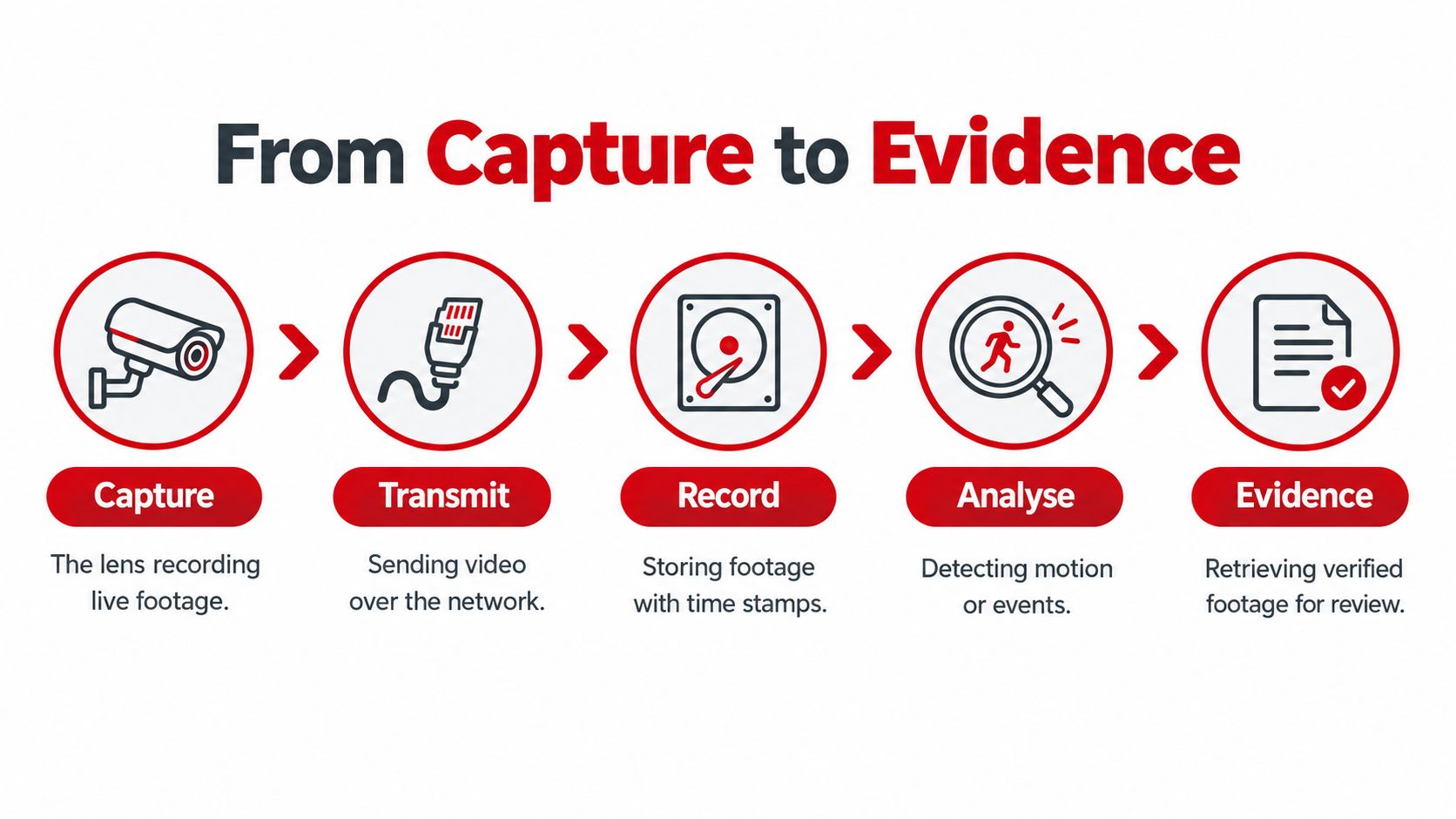
The imaging chain has several failure points
The useful result depends on every stage working together:
Capture: The lens and sensor must receive enough usable light, with a field of view suited to the task.
Transmit: The system must carry the video without damaging continuity or losing important frames.
Record: The recorder must preserve the intended quality, timing, and playback capability.
Review: An operator or investigator must locate the correct event efficiently.
Evidence: The exported file must remain authentic, playable, secure, and properly documented.
A live monitor can look impressive while the recorded image is blurred, compressed, or missing the detail needed for identification. UK police guidance therefore stresses that recorded footage, rather than the live display alone, must be assessed. That distinction should shape commissioning at entrances, reception desks, loading areas, and perimeter routes.
The same principle applies to vacant sites. Facilities teams reviewing vacant property security procedures should consider not only whether cameras are present, but also who checks alerts, how footage is retrieved, and how an incident is escalated.
How Cameras Capture and Encode Video
A CCTV camera starts with light. The lens gathers that light and determines how much of the scene appears in the image. A wide lens can cover more area, but it may place fewer pixels on a face at the far end of the view. A narrower lens can provide greater detail over a smaller area, but it may leave blind spots.
The image sensor, commonly CMOS, turns the light into an electrical image. The camera then adjusts exposure, white balance, and noise reduction before compressing the video into a stream suitable for recording or transmission.
The practical sequence
The lens frames the scene. Check whether the camera is aimed at the operational target, not merely at the general room.
The sensor samples the light. Poor illumination, glare, or strong backlighting can hide facial and clothing detail.
The camera processes the image. Exposure and gain settings affect brightness, noise, and motion clarity.
The encoder compresses the frames. Compression saves bandwidth and storage, but aggressive settings can smear movement or remove fine detail.
The network or recorder carries the stream. Dropped frames or an unsuitable recording profile can create gaps in the evidence.
Why megapixels aren't enough
A higher pixel count doesn't automatically produce better identification. Lens selection, pixel density, frame rate, lighting, shutter speed, and compression all affect what the operator can actually see. A high-resolution camera aimed at a bright window may produce less useful evidence than a lower-resolution camera correctly positioned and illuminated.
Frame rate influences motion continuity. If someone runs through an entrance, insufficient motion handling can leave a sequence difficult to interpret. Excessive gain can introduce noise, while slow shutter settings can create blur. These are commissioning issues, not problems that can always be fixed after an incident.
UK guidance states that the required resolution, compression level, and pictures per second depend on the operator's purpose. Specify the target view first, then choose the camera and recording settings that support it. Test the recorded output in daylight and low light, export a sample, and play it on the equipment that will be used for evidence review. Standards including BS EN 62676-1-1, BS EN 62676-4, and BS EN IEC 62676-5 provide relevant reference points for system requirements, installation, testing, and camera image quality. These standards are cited in UK recommended standards for the surveillance-camera industry.
Analog versus IP CCTV Systems Explained
Analogue and IP systems can both support effective workplace security. The better choice depends on the existing cabling, the required coverage, the organisation's IT environment, remote-access needs, and how the team expects to search and share footage.
An analogue camera sends its signal over coaxial cable to a digital video recorder. The recorder converts and stores the footage, while network access may be added at the recorder. An IP camera encodes the video within the camera and sends data packets across Ethernet or another computer network to a network video recorder or management platform.
Feature | Analog CCTV | IP CCTV |
|---|---|---|
Transmission method | Analogue video over coaxial cable | Encoded digital video over a computer network |
Storage role | DVR stores converted video | NVR or network platform stores the digital stream |
Scalability | Expansion may require additional coaxial runs and recorder capacity | Expansion can fit into an existing network, subject to bandwidth and design |
Remote access | Usually configured through the recorder | Commonly integrated into network and remote-management workflows |
Typical use | Existing analogue installations and straightforward replacements | New builds, distributed sites, detailed analytics, and networked operations |
Where analogue still makes sense
An analogue system can be practical when a site has serviceable coaxial cabling and the requirement is limited. Reusing existing routes may reduce disruption during a refurbishment. It can also avoid placing every camera directly onto the corporate data network.
The limitation is flexibility. Adding new buildings, integrating access-control events, or expanding remote management can require additional equipment and careful recorder planning. Image quality and functionality also depend on the specific analogue technology, not just the label.
Where IP earns its place
IP architecture suits workplaces that need distributed cameras, centralised management, remote viewing, or integration with other networked systems. It can make camera placement more flexible, but it introduces network dependencies. Bandwidth, switch capacity, power delivery, cybersecurity, user permissions, and recorder resilience must be designed rather than assumed.
The decision shouldn't be based on a contractor's preferred product. Ask which architecture makes retrieval, maintenance, access control, and future changes easiest for the people who will operate the site. A technically complex system that nobody can administer reliably is a poor operational choice.
From Incident to Court-Ready Footage
The incident clock starts when something happens, not when someone eventually opens the CCTV software. If footage continues recording, the relevant period may be overwritten before a manager identifies the need to preserve it. The first action is therefore to protect the likely time window and record who authorised that preservation.
A practical evidence workflow
Confirm the event window: Gather incident reports, access-control records, delivery logs, and witness accounts. Don't rely on a clock that hasn't been checked.
Synchronise and document time: Compare camera, recorder, access-control, and incident-report times. Record any offset instead of silently correcting the narrative.
Identify the camera: Use a clear camera register and note the location, direction, and system identifier.
Preserve the original: Export in the native file format where possible. UK guidance warns that conversion can reduce image quality or remove metadata.
Verify the export: Play the file on the intended review equipment, check that the time range is complete, and retain the original alongside any viewing copy.
Log handling: Record the exporter, date, reason, file details, recipient, and transfer method. Restrict access to authorised users.
Escalate early: If lighting, occlusion, compression, or camera placement prevents identification, state that limitation clearly rather than overstating what the footage proves.
The demand is operational, not theoretical. South Holland reported 514 CCTV evidence packages for police or court use in 2024–25, while 61% of police CCTV image searches produced evidential images, compared with 58% the previous year and 51% two years earlier. These figures appear in the council's Crime and Disorder Report appendix.
Runnymede's 2024 report recorded 6,499 CCTV incidents, 103 staff video reviews, and 571 requests for video uploads, also demonstrating that passive recording creates work for people who must search, review, and transfer footage. A documented 24-hour security monitoring service should therefore define what happens after an alert, including preservation and evidence requests.
Practical rule: A court-usable clip is the result of controlled retrieval, verification, and handling. Recording alone isn't an evidence process.
UK Surveillance Law and Compliance Rules
A workplace CCTV system processes information about identifiable people, so technical operation and lawful governance must be designed together. The ICO states that organisations using video surveillance to process personal data must comply with the UK GDPR and the Data Protection Act 2018. Its guidance on video surveillance, including CCTV covers traditional CCTV as well as ANPR, facial recognition, body-worn video, drones, dashcams, and smart doorbells.
Purpose and proportionality
The Protection of Freedoms Act 2012 established the framework for public-space surveillance cameras in England and Wales. The Surveillance Camera Code of Practice was first issued in August 2013, and its revised version took effect on 12 January 2022, as described in the Surveillance Camera Code of Practice guidance.
The Surveillance Camera Code of Practice contains 12 guiding principles covering legitimate purposes, proportionality, transparency, secure storage and responsible use of surveillance systems.
Although the statutory duty to have regard to the Code applies to specified public authorities rather than most private businesses, its principles provide useful guidance for commercial CCTV operations. Private organisations processing identifiable CCTV footage must also meet their obligations under applicable data protection legislation, including the UK GDPR and Data Protection Act 2018.
Daily controls matter
Clear signage should identify surveillance and provide appropriate information. Access permissions should reflect job responsibilities rather than convenience. Audio recording is particularly intrusive and should not be enabled casually. Cameras capturing neighbouring homes, private areas, or more public space than necessary need careful review.
Subject-access requests, police requests, tenant enquiries, and internal investigations should follow documented routes. Facial recognition and other analytics require a separate proportionality assessment, not automatic approval because the camera already exists.
For context, a 2015 government speech estimated between 4 million and 6 million cameras in the UK, with people in urban areas potentially passing through about 30 surveillance-camera systems during ordinary daily activity. The same speech stated that around 5% of cameras fell directly under the Code's mandatory coverage, because many were privately operated. Those figures reinforce why private workplace operators still need their own governance rather than assuming public-sector rules cover every installation.
Monitoring, Alerting, and Escalation Workflows
A useful alert starts a decision process. It shouldn't end one. Movement or line-crossing analytics may identify activity, but an operator must assess whether the trigger represents an intrusion, delivery, tailgating event, or environmental movement.
A workable escalation path assigns responsibility in advance. The operator verifies the scene, checks related cameras, contacts on-site security or the duty manager, and calls emergency services when the circumstances require it. The team should also record the decision, because an alert without an incident log leaves the next shift without context.
Remote monitoring can support existing cameras without requiring immediate replacement. For organisations reviewing CCTV monitoring services, the important questions are who verifies alerts, how operators reach the site, how footage is preserved, and how the client receives a record of activity.
The guidance on avoiding CCTV monitoring mistakes is useful background when reviewing false alarms, poor camera placement, and weak response procedures.
A short operating procedure should define alert categories, verification steps, escalation contacts, privacy restrictions, and evidence preservation. Analytics should reduce routine workload, not remove human accountability.
Practical Takeaways for Facilities Managers
Start with an incident test, not a camera-count review. Ask a team member to locate a known event, export it in the native format, verify playback, identify the camera and time, and explain who handled the file. If that exercise is slow or uncertain, the system needs operational work even if every camera is recording.
Review the target views at entrances, reception, loading areas, and perimeter routes. Check low-light performance, recorder settings, clock synchronisation, retention and overwrite controls, user permissions, signage, and the process for police or subject-access requests.
The useful measure is simple: Can the right person retrieve reliable, relevant footage lawfully when an incident occurs?
More cameras may increase coverage without improving identification. A smaller system with tested retrieval, disciplined maintenance, clear escalation, and proportionate governance can produce better outcomes than a larger installation that nobody can search or defend.
Solomon's Facilities Management provides London facilities teams with integrated security support, including CCTV monitoring, incident escalation, footage retrieval, and documented monitoring reports for existing camera infrastructure. Visit Solomon's Facilities Management to discuss a practical monitoring and evidence-handling process for your workplace or property.

Comments